Scoops on a cone.
On your keyboard, W·S·X stack vertically in the same column — like three scoops on a cone. Easy to find without looking down.
Compare any page across development, staging, and production in a single keystroke. Path, query string, and hash come with you — so you can spot the difference without losing your place.
Where you build and break. One keystroke brings you here from any other environment, same page intact.
The dress rehearsal. Hop in to verify a fix matches dev, then jump to prod with one keystroke — never retyping a URL.
What your users actually see. Compare it against staging or dev at the exact same page, instantly.
Configure your domains once. From then on, every URL path, query parameter, and hash fragment travels with you when you compare environments — no copy-paste, no losing your place.
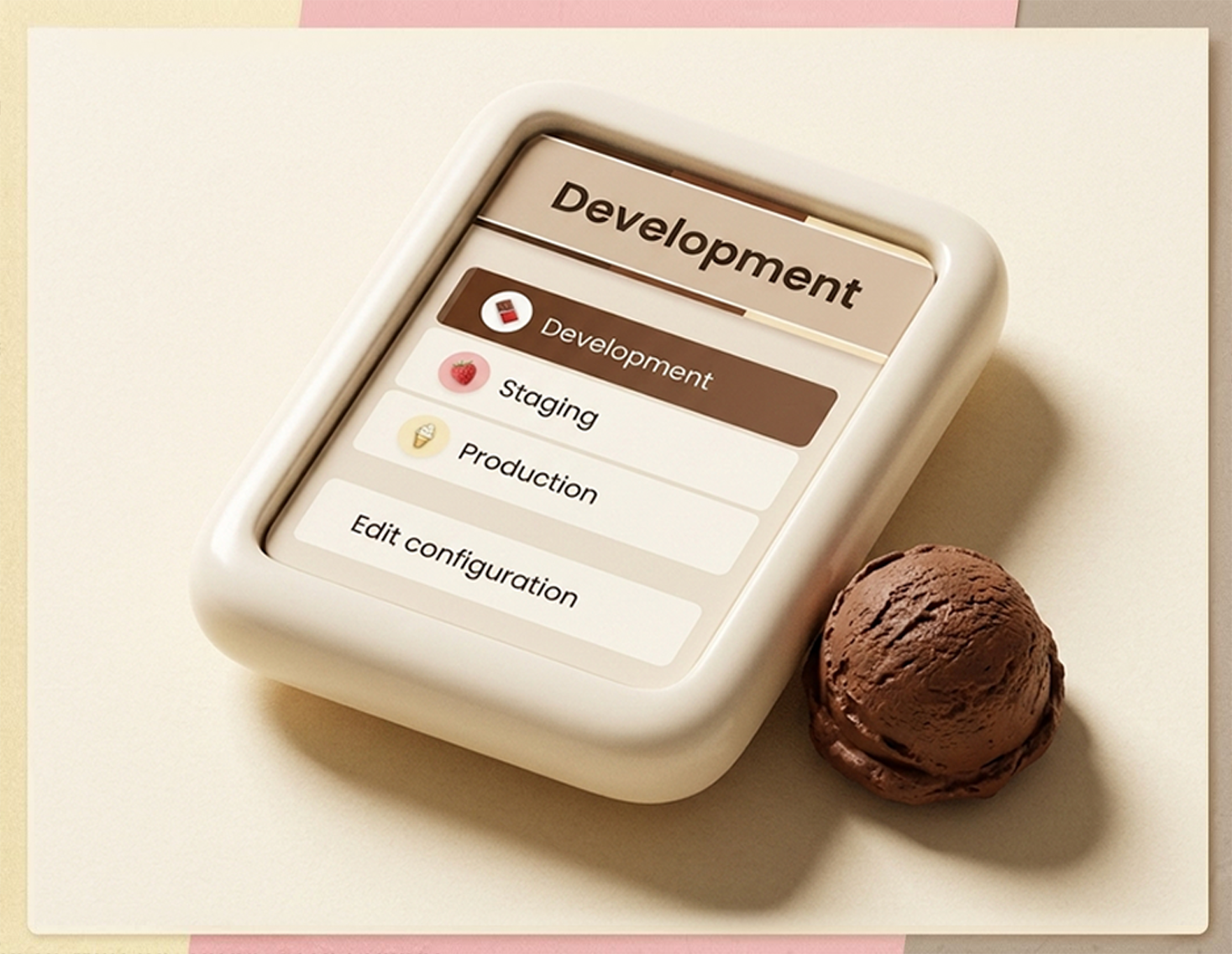
Browse to any configured site, click the icon, pick an environment. The popup shows you exactly where you are and where you can go.
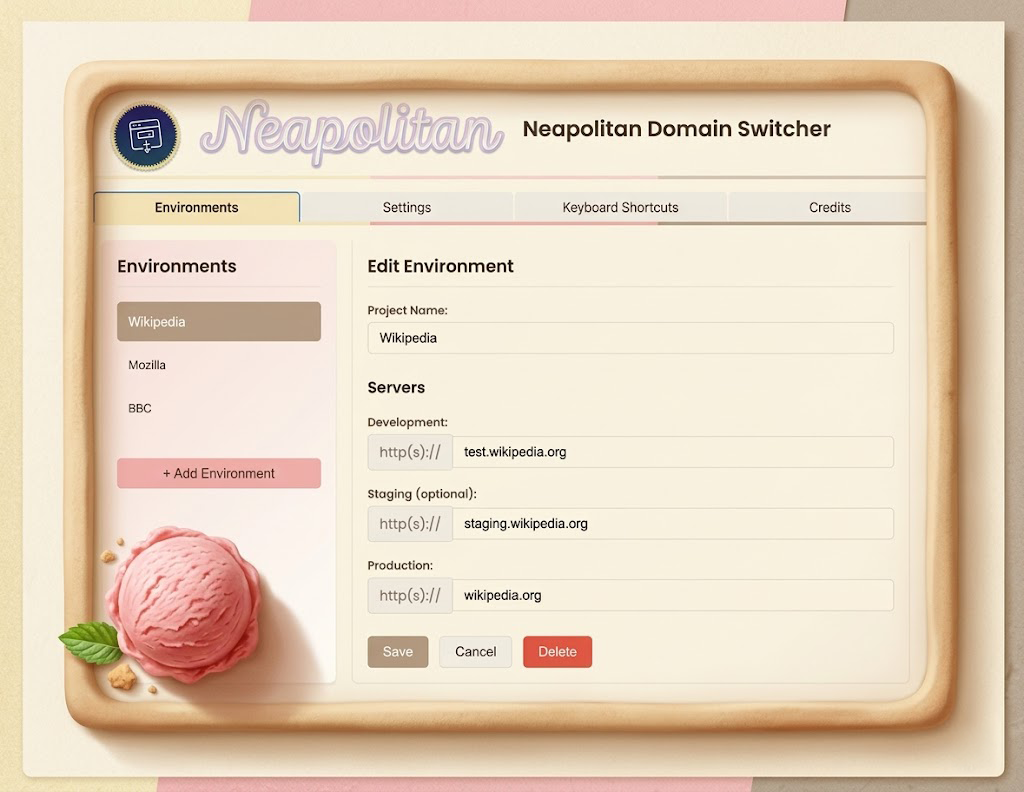
Define your projects and their environment URLs. Neapolitan auto-detects which environment you're in based on the current tab.
Three scenarios that show up every week if you ship software.
Click into the broken page. Hit Alt+X. You're in dev at the exact same URL, ready to reproduce.
Cycle Alt+X → Alt+S → Alt+W. Three environments, same page, side by side.
Send them the prod URL. They install Neapolitan, hit a key, and they're on the matching staging page in one second.
Pick a scheme below and set it yourself — here are four worth copying. Each one earns its place differently.
chrome://extensions/shortcuts and copy whichever scheme below matches your muscle memory.
On your keyboard, W·S·X stack vertically in the same column — like three scoops on a cone. Easy to find without looking down.
Just count: 1 for dev, 2 for staging, 3 for prod. The hardest scheme to forget — and the most obvious mental model on the planet.
The keys you already use a thousand times a day — C·S·V. They also happen to be Chocolate, Strawberry, Vanilla, so the metaphor maps perfectly to the flavor codes.
Forget the dessert metaphor — D·S·P stands for Development, Staging, Production. Easy to remember, but the P key sits so far from the others that you either chord with two hands (a "split") or stretch your fingers across the keyboard — not ideal when your other hand is on the mouse.
Designed by a working developer to disappear into your workflow until you need it, then deliver instantly.
Your URL path, query parameters, and hash fragments come with you when you switch — no copy-pasting, no losing your place.
Neapolitan recognizes which environment you're in automatically. The icon updates the moment you load a configured site.
Configure as many products and domain mappings as you need. Each gets its own set of environment URLs.
Neapolitan (default), Dark, Light, and High Contrast. Pick the one that fits your editor and your environment.
The default shortcuts work out of the box. Remap them in Chrome's extension shortcut settings to fit your muscle memory.
No analytics, no telemetry, no data collection. Neapolitan runs entirely on your machine — and the source is on GitHub.
The first version of this lived in my own browser for a decade — 45 lines of JavaScript, written one afternoon because our server names were numbered and forgettable. Before that, I'd been rewriting URLs by hand, every hour, for years.
It was “good enough for me.” So it stayed that way — unchanged, unshipped, unmentioned.
Then Chrome's Manifest V3 forced a rewrite. I could retire the tool or rebuild it properly. I picked rebuild — modern extension architecture, redesigned UI, Safari support, the documentation I'd never bothered to write. Same idea, twelve years of refinement, and now it's free for everyone.
You could, and if your only goal is to route a single hostname to localhost, that's fine. But hosts file edits change the meaning of a URL globally for every app on your machine, they can't preserve a path while you swap environments, and they don't survive switching projects. Neapolitan lives in the browser, switches per-tab, and keeps your path/query/hash intact.
Profiles are about isolating cookies and extensions. Neapolitan is about translating URLs. You can absolutely use both — pair Neapolitan with a "work" profile if you want — but profiles don't help you load the same page on dev when you're staring at prod.
tabs to read the current tab's URL and navigate it. storage to save your environment configurations locally. <all_urls> so it can recognize and switch between any sites you've configured — Neapolitan never reads page contents, only the URL bar. See the privacy page for the full breakdown.
No. No analytics, no telemetry, no remote config, no servers. Your environment configurations are stored locally via chrome.storage.local and never leave your browser. The code is open source — verify it yourself on GitHub.
Yes. Any browser that installs Chrome Web Store extensions can run Neapolitan — Edge, Brave, Arc, Vivaldi, Opera. Safari has a separate build (see the Safari installation guide) since Apple's extension system is different.
Chrome doesn't let extensions bind keyboard shortcuts for you — so Neapolitan ships with none bound by default. You decide what to use, at chrome://extensions/shortcuts. The site lists four recommended schemes (The Classic, 1·2·3, Neapolitan, Banana Split) but you can pick anything that doesn't collide with what you already use. Browser-bound keys also only fire in the browser, so your IDE bindings are never touched.
Yes and yes. MIT licensed, open source, no paid tiers planned. If you want to support development, the most helpful thing is a Chrome Web Store review and a star on the repo.
Free. Open source. Available for Chrome and Safari today.
Add to Chrome